PORTFOLIO
Selected Projects
My approach to UX design is rooted in empathy and accessibility. I focus on creating inclusive digital systems that are intuitive and impactful, ensuring every interaction feels deliberate and every user feels heard.
Senior Capstone:
Good Neighbors

The Idea
Good Neighbor is a community-focused digital service platform built to connect people who need help with everyday tasks to volunteers who are ready to provide it. The core insight behind the project was simple but important: people who need assistance often don't know where to look, and people who want to volunteer often can't find flexible, accessible ways to do so. Good Neighbor was designed to solve both problems at once, creating a centralized space for local, informal community support that didn't exist before.
The project was completed as a capstone at the University of Wisconsin-Milwaukee in Spring 2026, in collaboration with teammates Benton Belzer, Alanda Jackson, and Nouchi Weber.
Research & Planning
The team began by identifying the core stakeholders across three tiers: those directly involved in the platform, those who interact with or support it, and those who benefit from it indirectly. From there, two user personas were developed to guide every design decision. Margaret Delvin represented the help-seeker, someone looking for accessible, easy-to-navigate support. Noelle Wilson represented the volunteer, someone motivated to give back but in need of a simple, flexible way to do so. Keeping both users in mind kept the team from designing for one experience at the expense of the other.
Design & Wireframes
The high-fidelity wireframes, built in Figma using the finalized Good Neighbor brand palette, mapped out the full user journey across six key screens: a landing page, sign-up flow, user dashboard, a two-step ad creation form, a browsable opportunity listing, and a job acceptance confirmation screen. The dashboard gave users visibility into their reputation score, subscription status, and active listings, making the platform feel personal and invested rather than transactional.
Visual Identity
The Good Neighbor brand centers on a warm terracotta palette and a logo featuring three houses above two hands in a handshake, with a heart in the center window. The mark communicates community connection, mutual aid, and neighborhood belonging in one clean image. The logo was created in Figma by Alanda Jackson.
Final Deliverables
The working prototype was built as a fully functional web application. It included user registration, a dashboard with ad status tracking, a two-step form for posting help requests, a browsable and searchable volunteer opportunity feed, a job acceptance and confirmation flow, and an admin portal for content moderation. The team also documented a roadmap of future enhancements including in-app messaging, a reputation and token economy, AI-driven volunteer matching, and native mobile apps.


UI Research Project:
FoodBridge
The Idea
Food waste is a problem that happens long before a finished dish ever hits the table. FoodBridge is a mobile application designed to address it at the source, connecting food service businesses with each other so that surplus ingredients can be shared or donated before they go to waste. Unlike existing platforms that focus on discounted finished goods, FoodBridge operates at the ingredient level, filling a gap that no other app quite addresses.
The Design Concept
The entire app was built around the metaphor of a community bulletin board, a deliberate choice to distinguish it from commercial marketplaces that can feel transactional and impersonal. The goal was to create a space where users feel like participants in a community rather than parties to a business deal. That philosophy shaped everything from the card-based listing layout to the warm, welcoming language used throughout the interface.
FoodBridge supports two user types, donor and recipient, but rather than creating separate account types, a single account supports both modes. This decision was made to simplify onboarding and keep the experience feeling unified rather than siloed.
From Concept to Prototype
One of the most important design decisions was breaking the listing process into four separate screens rather than one long form. An early wireframe had everything on a single page, but it quickly became clear that approach would overwhelm users, particularly restaurant staff using the app one-handed in a busy kitchen. Spreading the flow across four focused steps, each with a clear progress indicator, reduced cognitive load and gave users a visible sense of momentum. The goal was for anyone to be able to post an ingredient listing in under two minutes.
The condition selection went through a similar evolution. A dropdown menu was replaced with large tappable buttons, faster and easier to use in a fast-paced environment.
Visual Identity
The visual design centered on a deep warm green, chosen to evoke fresh produce and give the app an inviting, organic feel. High contrast was a priority throughout: dark text on white backgrounds, white text on green buttons, and a minimum font size of 20 across every screen to ensure legibility for all users. The leaf logo, simple and clean, reinforced the fresh produce theme without cluttering the interface.
Final Deliverables
The completed prototype walked users through the full donor experience: logging in, arriving at the home screen, posting a surplus ingredient listing across four guided steps, reviewing the listing summary, and receiving confirmation that it had been shared with the community.
UX Case Study:
Your Best Hair Day


The Idea
After nearly two decades in the hair industry, I know firsthand how overwhelming it can be to find the right products for your hair. That frustration was the seed for Your Best Hair Day, a website designed to take the guesswork out of building a personalized haircare routine. The concept was simple: answer a few questions about your hair and walk away with a customized product recommendation tailored specifically to you.
Research & Competitive Analysis
Before sketching a single screen, I looked closely at two competitors: Sephora and Kevin Murphy. Sephora offered an enormous range of products but its interface was cluttered and overwhelming. Kevin Murphy's website was clean and led with a product quiz front and center, but as a single-brand site, every recommendation came with an obvious conflict of interest. My goal was to combine the best of both while adding something neither offered: a genuinely unbiased, user-first approach to product discovery.
Understanding the User
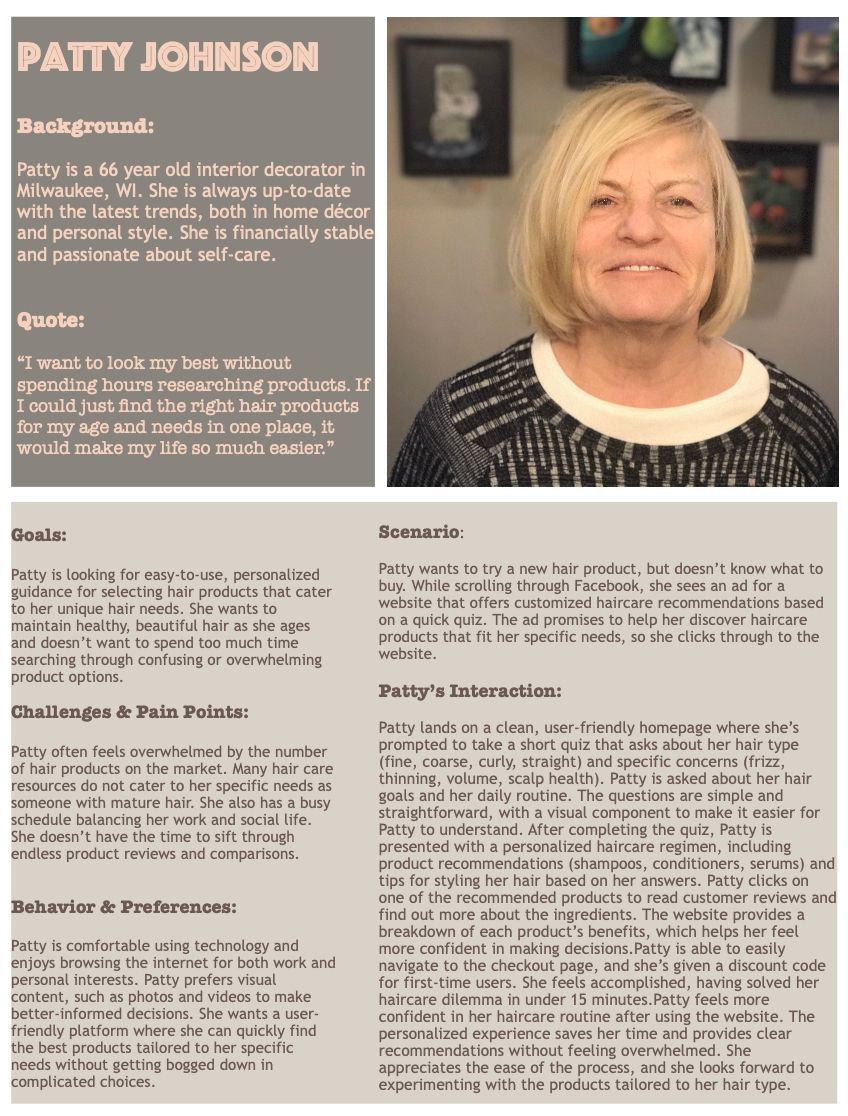
I developed a user persona, Patty Johnson, a 66-year-old interior decorator from Milwaukee. Tech-savvy and style-conscious, Patty is consistently let down by haircare resources that don't speak to her needs as someone with mature hair. Keeping her in mind pushed me to prioritize visual clarity, plain language, and a calm, uncluttered layout.
From Sketch to Prototype
My sketches mapped the full user journey from homepage to results. As the project evolved, some ideas simplified in satisfying ways. A planned "Defining Your Hair" pop-up turned out to be unnecessary once I found graphics that incorporated visual illustrations directly into the quiz answer options. The final prototype consisted of nine pages and made deliberate accessibility choices throughout, including high-contrast text, a fixed header, and a cohesive visual identity across every page.
Visual Identity
The branding came together around a warm terracotta and blush palette that felt modern and approachable. The logo paired a clean spaced serif with a chunky rounded display font, giving the brand personality without sacrificing legibility.


Let’s build something better
Currently open to new UX opportunities and collaborations. I’d love to hear about what you’re working on or simply chat about UX design.